

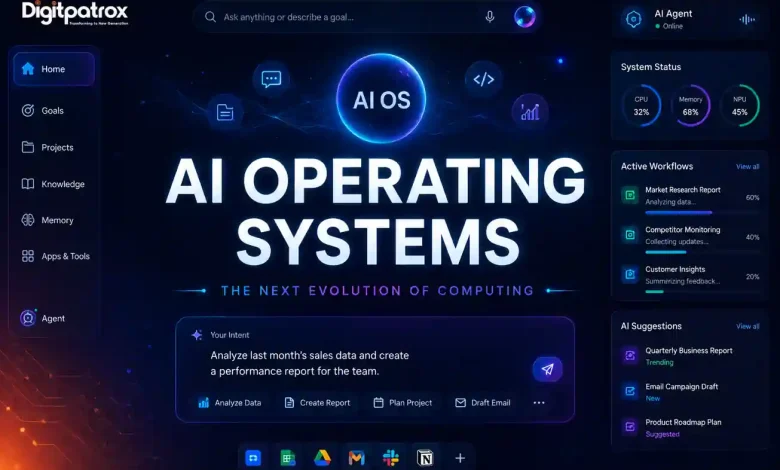
AI Operating Systems Explained: How AIOS Could Replace Apps, Browsers, and Manual Workflows
The next computing era may be defined not by apps—but by AI orchestration. For forty years, we have lived in the “App-and-Window” era, where humans act as the manual bridge between siloed software. An AI Operating System (AIOS) flips this model: it turns the computer into a single, reasoning entity where the AI is the “Kernel” that manages your software, files, and hardware on your behalf.
What Is an AI Operating System? (Simple Explanation)
An AI Operating System (AIOS) is a new type of computing experience where AI becomes the main interface between you and your software. Instead of manually opening apps, switching tabs, and clicking through menus, you simply describe a goal—and the AIOS handles the orchestration.
For example:
-
Traditional Way: You open Microsoft Excel to find data, a browser to find benchmarks, and Microsoft Outlook to write an email.
-
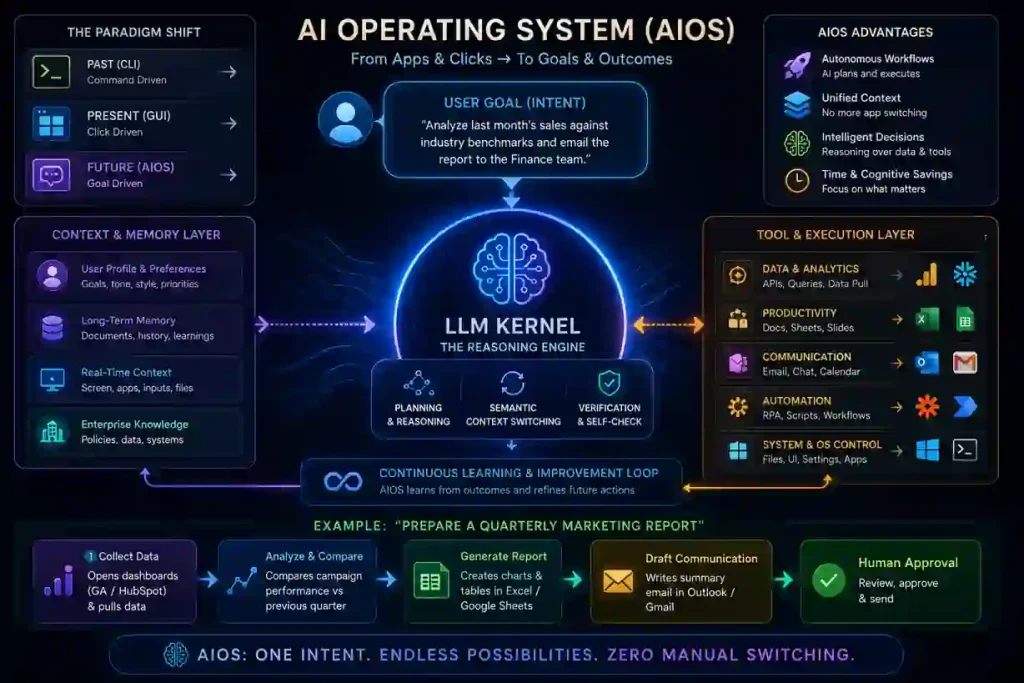
AIOS Way: You say, “Analyze last month’s sales against industry benchmarks and email the report to the Finance team.” The AIOS chooses the tools, executes the logic, and manages the workflow in the background.
I. Traditional OS vs. AI Operating System
The shift from a traditional OS like Windows or macOS to an AIOS is the difference between a toolbox and a craftsman.
| Feature | Traditional OS | AI Operating System (AIOS) |
| Logic Type | Deterministic (If X, then Y) | Probabilistic (Reasoning-based) |
| Primary Unit | The App / The File | The Goal / The Intent |
| Navigation | Manual (Clicks/Taps) | Autonomous (Agentic Workflows) |
| Connectivity | Siloed Apps | Unified Context Kernel |
| Decision Making | User-led | AI-orchestrated |
Visualizing the Evolution of Computing
| Computing Era | Interface | Interaction Model |
| CLI (1970s) | Text Terminal | Command-driven (Requires technical knowledge) |
| GUI (1980s-2020s) | Desktop / Windows | Click-driven (Requires manual app-switching) |
| AIOS (2026+) | Natural Language | Goal-driven (Autonomous orchestration) |
II. Why Current “AI PCs” Still Feel Incomplete
Many users are currently using “AI PCs” equipped with NPU chips, yet the experience still feels like a standard laptop with a chatbot pinned to the taskbar.
In my experience, current implementations like Windows Copilot are merely “Top-Layer Applications.” They lack Kernel-Level permissions. A true AIOS doesn’t just “talk” to you; it has the authority to move files, execute code, and manipulate the UI of other apps without human intervention. Most current AI operating system concepts are still hybrid systems layered on top of traditional operating systems rather than fully autonomous replacements.
III. The LLM Kernel: The Engine of the Future
Extraction Block: The core of an AIOS is the LLM-Kernel. This engine replaces the traditional scheduler with a reasoning loop that manages three critical layers: Contextual Memory, Tool Interaction (APIs), and Reasoning-at-Rest. In reality, platforms like Windows and macOS will gradually absorb these layers until the traditional GUI is secondary.
-
-
Named Mechanism: Semantic Context Switching.
-
Real System Example: OpenAI’s “Operator” or Claude’s “Computer Use” capability—systems that can “see” the UI and take actions like a human user.
-
Example: How an AIOS Handles a Real Task
User Goal: “Prepare a quarterly marketing report.”
AIOS opens analytics dashboards (Google Analytics/HubSpot).
AIOS pulls campaign performance data and compares it to previous quarter metrics.
AIOS generates charts in Microsoft Excel or Google Sheets.
AIOS drafts a summary email in Microsoft Outlook or Gmail.
Human Involvement: Final approval and “Send.”
IV. What AI Operating Systems Mean for SaaS Companies
The rise of AIOS creates a massive shift for Software-as-a-Service (SaaS) providers. When the OS becomes the primary interface, individual App UIs become less relevant. This shift could fundamentally reshape enterprise software pricing, user analytics, and customer retention models.
-
APIs are the new UI: Success for a SaaS company will depend on how well an AI agent can “read” their API, not how pretty their dashboard is.
-
Background Services: Apps effectively become “background services” that provide logic and data to the AIOS kernel.
-
Subscription Shifts: If users no longer log into the app UI, SaaS companies may move toward “usage-based” or “agent-access” pricing models.
V. Why AI Operating Systems Create Major Privacy Risks
To be useful, an AIOS requires “Total Context Access.” It must monitor your keystrokes, screen, and unencrypted files to understand your intent. This creates a Hard Security Risk: a single “Prompt Injection” could theoretically command your entire OS to exfiltrate every piece of data it has “seen.” Enterprises adopting AIOS architectures will likely require new governance layers for auditability, memory management, and permission control.
-
Mechanism: Context Poisoning.
-
Scar Tissue Layer: In my experience, Security (CISO) departments are the primary blockers of AIOS adoption. They view the “Unified Kernel” as a single point of failure that destroys the Cybersecurity Sandbox model.
VI. AIOS Timeline: What Happens Next?
| Year | Likely Shift |
| 2026 | Hybrid AI assistants integrated deeply into Windows and macOS. |
| 2027 | Cross-app autonomous workflows (e.g., OpenAI Operator) become mainstream. |
| 2028 | AIOS layers replace manual navigation for the majority of knowledge work. |
| 2030+ | Fully agentic operating systems emerge where the GUI is optional. |
VII. How to Prepare for AI Operating Systems
| Maturity Stage | Tactical Action | Confidence Level |
| Stage 1: Exploration | Audit your “Cross-App” workflows. Which tasks require you to copy-paste between 3+ apps? | 95% |
| Stage 2: Pilot | Experiment with frameworks like LangGraph or Microsoft AutoGen to see how agents collaborate. | 75% |
| Stage 3: Integration | Implement a Vector Database for your personal files to prepare for a “local-first” AIOS kernel. | 50% |
The Bottom Line
AI Operating Systems are not simply “smarter desktops.” They represent a shift from manual software navigation to autonomous workflow orchestration. The long-term winner may not be the company with the best apps—but the company with the best AI kernel. The operating systems of the future may no longer be defined by files, folders, and windows—but by memory, reasoning, and autonomous execution.
VIII. SERP Capture Layer
-
5 FAQ Questions:
-
Will an AIOS replace my apps? (A: It will hide them. You interact with the Agent; the app provides data in the background).
-
Is Windows 12 an AIOS? (A: It is expected to integrate the first “Hybrid” AIOS features like Recall).
-
Does an AIOS need an internet connection? (A: Most “Sovereign AIOS” models run locally on high-end NPUs for privacy).
-
What is an LLM Kernel? (A: The reasoning engine that decides which hardware/software resources to use).
-
Are AIOS safe for work? (A: Only if they follow the AGES Framework for reliability).
-
-
Meta Description: AI Operating Systems (AIOS) could replace apps, browsers, and manual workflows. Learn how AIOS works, the role of LLM kernels, privacy risks, and the future of AI-native computing.
-
Closing Prediction: The next operating system battle may not be Windows vs. macOS – but “manual computing” vs. “autonomous computing.”
